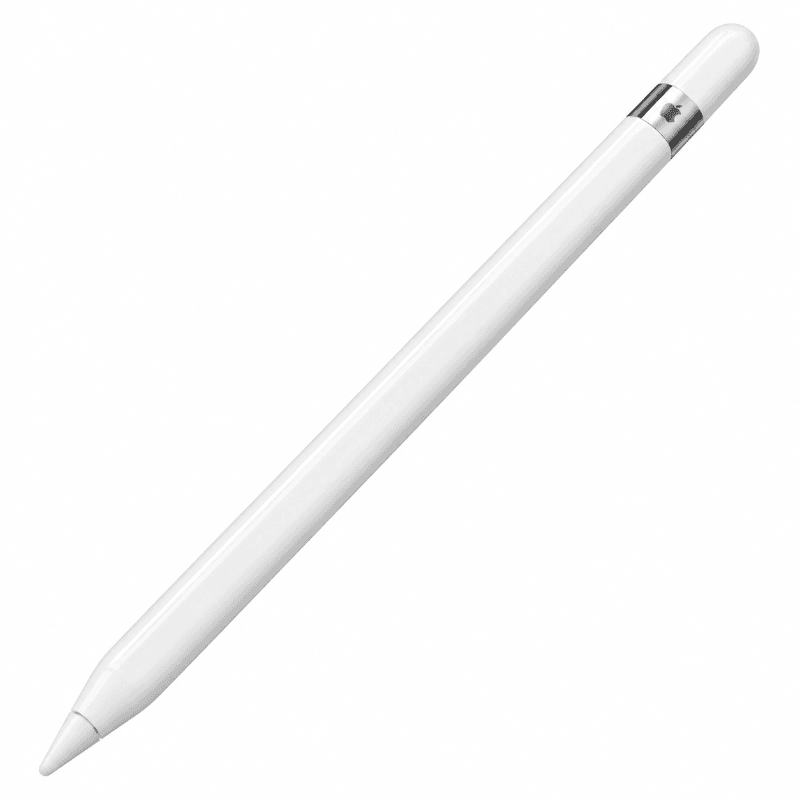
Apple Pencil (1st Generation)
0.0/5 (0 reviews)
Free Next Day Delivery
Free 30 Day Return
Free Delivery
Warranty Included
Fast Shipping
Secure Payment
Comes with
Recently Viewed Products
You haven't viewed any products yet. Start exploring our catalog!
Products You May Like
Product Summary :
The Apple Pencil (1st Generation) is a premium digital stylus designed to deliver precise writing, natural drawing, accurate sketching, and responsive touchscreen interaction on compatible Apple iPad models. Featuring a sleek white design, pressure sensitivity, tilt recognition, and low-latency input, the Apple Pencil provides a smooth and intuitive experience for note-taking, illustration, document annotation, and creative applications. Introduced in 2015, the Apple Pencil (1st Generation) uses advanced sensor technology to detect different levels of pressure and the angle at which the pencil is held, allowing users to create fine lines, bold strokes, and natural shading effects in supported applications. It connects to compatible iPads through Bluetooth and uses its built-in Lightning connector for pairing and charging on supported models. With a rechargeable battery offering up to approximately 12 hours of use under Apple's original testing conditions, the Apple Pencil provides convenient performance for students, artists, designers, professionals, and everyday iPad users. Its lightweight cylindrical design, replaceable tip, and broad compatibility with selected iPad, iPad mini, iPad Air, and iPad Pro models make it a versatile accessory for creativity and productivity.
Product Description :
The Apple Pencil (1st Generation) combines Apple's precision stylus technology with a comfortable design and advanced input capabilities to enhance the experience of using a compatible iPad. Designed for users who want greater control when writing, drawing, sketching, or interacting with creative applications, the Apple Pencil provides responsive input with pressure and tilt sensitivity. Its fine tip allows users to write handwritten notes, draw detailed illustrations, highlight documents, and make precise adjustments in supported applications. The Apple Pencil communicates wirelessly with compatible iPads through Bluetooth, while its integrated Lightning connector enables pairing and charging on supported devices. For the iPad (10th Generation) and iPad (A16), a compatible USB-C to Apple Pencil Adapter is required for pairing and charging. The rechargeable battery provides up to approximately 12 hours of use under Apple's original testing conditions, while quick charging offers convenient power during busy work or study sessions. With its elegant white finish, lightweight construction, and compatibility with a wide range of supported iPad models, the Apple Pencil (1st Generation) is an excellent accessory for students, creative professionals, educators, business users, and anyone who wants a more natural and precise way to interact with their iPad.
Premium Apple Pencil Design
The Apple Pencil (1st Generation) features a sleek, minimalist cylindrical design with a smooth white finish. Its carefully balanced construction provides a familiar pen-like feel, making it comfortable to hold during writing, drawing, and everyday touchscreen interaction. The elegant exterior complements compatible Apple iPads and offers a professional appearance suitable for work, education, and creative environments.
Designed for Compatible Apple iPads
The Apple Pencil (1st Generation) is specifically designed for selected Apple iPad models that support its technology. It provides enhanced writing and drawing capabilities compared with ordinary capacitive styluses. Compatibility depends on the exact iPad model, and it does not work with every iPad or other touchscreen device.
Precision Writing Experience
The Apple Pencil provides precise input for handwriting, note-taking, and document annotation. Its fine tip allows users to write naturally on a compatible iPad screen, making it useful for digital notebooks, study materials, meeting notes, and everyday productivity. Supported applications can recognise detailed pen movements for accurate handwriting and drawing.
Advanced Pressure Sensitivity
The Apple Pencil (1st Generation) features pressure sensitivity that responds to how firmly the user presses the tip against the screen. In compatible applications, lighter pressure can create thinner strokes, while increased pressure can produce thicker or more prominent lines. This functionality helps create a natural writing and drawing experience.
Intelligent Tilt Sensitivity
The Apple Pencil includes tilt recognition technology that detects the angle at which the stylus is held. Supported drawing applications can use this information to produce shading effects and different brush characteristics. This feature is particularly useful for sketching, digital painting, and illustration.
Low-Latency Performance
The Apple Pencil is designed to provide responsive input with minimal perceived delay on compatible iPads. This helps create a natural connection between hand movement and on-screen results. Actual responsiveness depends on the iPad model, display technology, application, and software configuration.
Fine Precision Tip
The Apple Pencil features a precision-engineered tip designed for accurate interaction with compatible iPad displays. The fine tip allows users to create detailed drawings, select small interface elements, write handwritten notes, and make precise edits in supported applications. Its design provides greater control than many conventional touchscreen styluses.
Replaceable Pencil Tip
The Apple Pencil (1st Generation) features a replaceable tip that can be removed and replaced when worn. This helps maintain consistent writing and drawing performance over time. Replacement tips are available separately, and the exact accessories included depend on the retail package.
Natural Drawing and Sketching
The combination of pressure sensitivity, tilt recognition, and precise tip control makes the Apple Pencil suitable for digital drawing and sketching. Artists and designers can create fine outlines, expressive strokes, and shaded illustrations in compatible creative applications. The stylus provides an intuitive experience for both beginners and experienced digital artists.
Digital Note-Taking
The Apple Pencil is a practical accessory for students, professionals, and everyday users who prefer handwritten notes. It can be used with supported note-taking applications to record ideas, prepare study notes, annotate presentations, and organise information. Its responsive input helps make digital handwriting feel more natural.
Handwriting in Apple Notes
The Apple Pencil supports handwriting in the Apple Notes application on compatible iPads. Users can write notes, draw diagrams, create sketches, and highlight information directly on the screen. Available handwriting features depend on the iPadOS version and supported software.
Scribble Handwriting Support
On compatible iPads running supported versions of iPadOS, the Apple Pencil can use Apple's Scribble feature to convert handwriting into text in supported text fields. This makes it convenient to enter information without switching to an on-screen keyboard. Language availability and functionality depend on the installed software.
Document Annotation
The Apple Pencil allows users to annotate compatible PDF files, documents, screenshots, and other supported content. Users can highlight text, add handwritten comments, draw attention to important details, and mark up documents. This makes the stylus useful for studying, reviewing contracts, editing presentations, and providing feedback.
Apple Markup Compatibility
The Apple Pencil supports Apple's Markup tools on compatible iPads, allowing users to draw, write, and highlight supported documents and images. Markup provides convenient tools for adding signatures, notes, and illustrations. Available functions depend on the application and iPadOS version.
Palm Rejection Support
Compatible iPads and applications support palm rejection when using the Apple Pencil, allowing users to rest their hand naturally on the display while writing or drawing. This helps improve comfort during longer sessions. Actual palm rejection behaviour depends on the device and application.
Bluetooth Wireless Connectivity
The Apple Pencil (1st Generation) communicates with compatible iPads through Bluetooth. This wireless connection enables the iPad to receive stylus input while allowing users to move freely across the screen. Initial pairing is completed through the appropriate Lightning or adapter-based connection.
Lightning Connector for Pairing
The Apple Pencil features a built-in Lightning connector located beneath its removable cap. On supported Lightning-equipped iPads, users can connect the Pencil directly to the iPad's Lightning port to begin the pairing process. This provides a straightforward connection method without complicated manual Bluetooth configuration.
Convenient Lightning Charging
The Apple Pencil (1st Generation) uses its integrated Lightning connector for charging. Compatible Lightning-equipped iPads can charge the Pencil directly, while suitable adapters provide alternative charging arrangements. The Pencil does not support magnetic wireless charging.
USB-C iPad Compatibility with Adapter
The Apple Pencil (1st Generation) is compatible with the iPad (10th Generation) and iPad (A16) when used with the appropriate USB-C to Apple Pencil Adapter. This adapter is required for pairing and charging on these USB-C-equipped iPad models. The adapter may need to be purchased separately depending on the product package.
Up to 12 Hours of Battery Life
Apple originally advertised up to approximately 12 hours of use on a full charge under specified testing conditions. This provides convenient power for writing, drawing, note-taking, and other supported activities. Actual battery life depends on usage, charging history, temperature, and battery condition. Previously used Apple Pencils may provide shorter battery life due to battery ageing.
Quick Charging Capability
The Apple Pencil (1st Generation) supports quick charging through its Lightning connection. Apple originally advertised that approximately 15 seconds of charging could provide up to 30 minutes of use under specified conditions. Actual charging performance depends on battery condition, temperature, and the charging equipment.
Built-In Rechargeable Battery
The Apple Pencil contains an integrated rechargeable lithium-ion battery that powers its sensors and Bluetooth connectivity. The battery is built into the stylus and is not designed for routine user replacement. Regular charging helps maintain availability for everyday use.
Lightweight and Comfortable Construction
The Apple Pencil weighs approximately 20.7 grams, making it comfortable to hold for writing, sketching, and detailed touchscreen work. Its slim cylindrical body resembles a traditional pen, helping provide a familiar grip during extended use. The balanced design supports precise movement and control.
Elegant White Finish
The Apple Pencil (1st Generation) is available in Apple's signature white finish. Its clean and minimalist appearance complements compatible iPads and provides a professional look suitable for different working environments. The smooth exterior is designed to be comfortable during everyday use.
Ideal for Students
The Apple Pencil is useful for students who want to take handwritten notes, solve mathematical problems, annotate study materials, and organise coursework digitally. Its precision tip and handwriting capabilities make it suitable for classroom activities, revision, and independent learning. Compatible applications provide additional tools for managing notes and assignments.
Excellent for Digital Artists
The Apple Pencil offers pressure and tilt sensitivity for compatible illustration and painting applications. Artists can use it to sketch concepts, create detailed drawings, apply shading, and work with digital brushes. Its responsive input helps support creative workflows on compatible iPads.
Suitable for Designers
The Apple Pencil provides precise input for supported design applications, making it useful for creating concepts, marking up layouts, sketching ideas, and reviewing visual work. Its fine tip allows accurate interaction with detailed content, while pressure and tilt sensitivity support expressive drawing tools.
Useful for Business Professionals
The Apple Pencil supports professional tasks such as signing documents, reviewing reports, adding handwritten notes, and annotating presentations. It provides a convenient alternative to typing when users want to make quick visual comments or handwritten corrections in supported applications.
Helpful for Teachers and Educators
Teachers and educators can use the Apple Pencil to annotate learning materials, demonstrate concepts, mark assignments, and create handwritten explanations. Its precise input makes it practical for interactive teaching, digital whiteboards, and supported educational applications.
Convenient for Everyday Creativity
The Apple Pencil is suitable for casual drawing, journaling, colouring, planning, and creative projects. Users can explore supported applications to create illustrations, handwritten notes, diagrams, and personalised content. Its intuitive design makes digital creativity accessible to a wide range of users.
Works with Compatible Creative Applications
The Apple Pencil supports numerous compatible iPad applications for illustration, handwriting, document editing, and design. Its pressure and tilt sensitivity can be used by applications that support these features. The availability of specific tools depends on the application, iPad model, and installed software.
No Separate Keyboard Required
The Apple Pencil provides a convenient handwriting input method for compatible iPads. Users can write notes, annotate documents, and enter supported handwritten text without needing a physical keyboard. This is especially useful for tasks where drawing or freehand input is more natural than typing.
Portable Everyday Accessory
The Apple Pencil's slim design makes it easy to carry alongside a compatible iPad. Its lightweight construction is suitable for commuting, classrooms, offices, and travel. A suitable protective holder or case can help prevent accidental loss or damage when the Pencil is not in use.
Simple Pairing Process
The Apple Pencil (1st Generation) is designed for convenient pairing with compatible iPads. On supported Lightning-equipped models, users connect the Pencil to the iPad's Lightning port and follow the pairing prompt. USB-C-equipped compatible models require the appropriate USB-C to Apple Pencil Adapter. Once paired, the Pencil communicates wirelessly through Bluetooth.
Compatibility with Selected iPad Pro Models
The Apple Pencil (1st Generation) supports several earlier iPad Pro models, including the 9.7-inch, 10.5-inch, and first- and second-generation 12.9-inch iPad Pro. These models provide a suitable platform for handwriting, drawing, and supported creative applications. Later iPad Pro generations use different Apple Pencil compatibility requirements.
Compatibility with Selected iPad Air and iPad mini Models
The Apple Pencil (1st Generation) supports the iPad Air (3rd Generation) and iPad mini (5th Generation). These compatible devices provide a compact and portable platform for handwritten notes, sketching, and supported productivity tasks. The Pencil is not compatible with every iPad Air or iPad mini generation.
Compatibility with Selected Standard iPad Models
The Apple Pencil (1st Generation) supports the iPad (6th, 7th, 8th, and 9th Generations), along with the iPad (10th Generation) and iPad (A16) when used with the required USB-C to Apple Pencil Adapter. This broad compatibility makes it a practical stylus for users with selected standard iPad models.
Not Compatible with Every iPad
The Apple Pencil (1st Generation) does not support every iPad model. In particular, it is not compatible with the iPad Pro 13-inch (M4), which requires a different Apple Pencil generation. Users should verify the exact iPad model before purchasing to ensure proper pairing, charging, and stylus functionality.
No Magnetic Wireless Charging
The Apple Pencil (1st Generation) does not support magnetic wireless charging or the magnetic pairing system used by some later Apple Pencil models. Its charging and pairing methods rely on its Lightning connector and compatible adapters. Magnetic attachment to the side of an iPad is not a supported charging method for this generation.
No Double-Tap Gesture
The Apple Pencil (1st Generation) does not include the Double Tap gesture available on certain later Apple Pencil models. Its primary functions focus on precise writing, pressure sensitivity, tilt recognition, and compatible touchscreen interaction. This makes it a straightforward stylus for essential creative and productivity tasks.
No Apple Pencil Hover Feature
The Apple Pencil (1st Generation) does not support the Apple Pencil hover functionality available with certain newer iPad and Apple Pencil combinations. Users interact with compatible applications through direct contact with the display. The stylus remains suitable for precise writing, drawing, and annotation.
Performance, Compatibility and Additional Features
The Apple Pencil (1st Generation) combines a precision tip, advanced pressure sensitivity, tilt recognition, Bluetooth connectivity, Lightning pairing and charging, and a rechargeable battery in a lightweight white design. It supports compatible handwriting, drawing, sketching, document annotation, and creative applications across selected iPad models. With up to approximately 12 hours of originally rated battery life, quick charging capability, a replaceable tip, and broad compatibility with supported iPads, the Apple Pencil provides a practical accessory for education, business, creativity, and everyday digital productivity.